Passer aux informations sur le produit
UGREEN Revodok Pro 14 - in - 1 Docking Station (Triple 4K, 2x DP + HDMI, 100W Charging, 10Gbps) - UGREEN EU
折扣旗帜
33% OFF
🔥Offre Prime Day | Jusqu'à 45 % de réduction

Station d'accueil UGREEN Revodok Pro 14-en-1 (Triple 4K, 2x DP + HDMI, charge 100W, 10Gbps)

Prix promotionnel  €199,99 Prix régulier  €299,99 Save33%
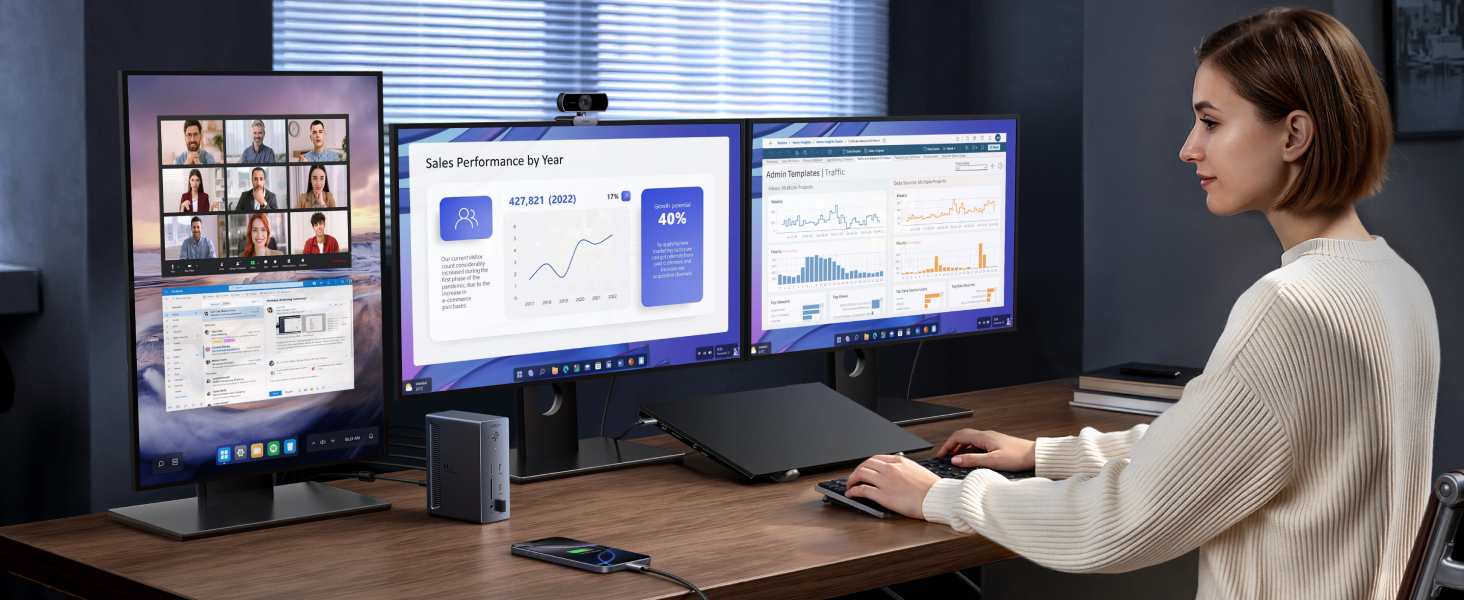
  • 14-in-1 Professional Connectivity: One-cable docking simplifies desk setup for hybrid office environments, equipped with 2 8K DisplayPort, a 4K HDMI port, a 100W USB-C upstream port, a 27W USB-C PD output, 2 USB-C 10Gbps data ports, 2 USB-A ports, 170MB/s SD/TF card slots, an Ethernet, a 3.5mm AUX port, and a 140W DC input
  • Single 8K, Triple 4K Display Versatility: Simultaneously drive three 4K monitors via dual DisplayPort and a HDMI port, enabling seamless multitasking. The dual DisplayPort both support up to 8K@30Hz or 4K@120Hz for a single monitor, delivers exceptional clarity and smoothness
  • True 100W Laptop Charging: Deliver full-speed 100W PD charging to high-performance laptops, replenishing 50% battery in 27 minutes. The USB-C PD port also supports charging your phone/tablet up to 27W (Note: The 100W upstream USB-C port and 27W USB-C output share a combined power of 100W. When both are in use, the maximum output power per port may be less than the individual rated maximum. )
  • Transfer Files in Seconds: Transfer 20GB files in 32 seconds through 10Gbps USB-C/A ports, while 170MB/s SD/TF card slots accelerate photo/video workflows. Gigabit Ethernet ensures stable video conferencing and cloud backups (Note: The front USB-C ports are for data transfer only, not support charging & display. )
  • Wide Compatibility: Supports USB-C, USB4, and Thunderbolt connections. Compatible with Windows 10 and 11, and laptops that support DP Alt Mode and Power Delivery
  • Extended Display Limited on macOS : The dock is not recommended for MacBook users who wish to connect mutli-monitors with different displays. For macOS, the external monitors will display identical content
  • Laptop's USB-C Requirements: The dock is plug and play, doesn't required install any drivers. For full compatibility, ensure your laptop's USB-C port supports both Power Delivery (for charging) and DisplayPort 1.2/1.4 Alt Mode (for display output), in addition to either USB4, Thunderbolt 5/4/3
  • In the Box: 1x Revodok Pro USB-C Docking Station, 1x USB-C to USB-C Cable (1m), 1x 140W Power Adapter, Power Cords (including UK plug)
L'avantage UGREEN
Expédition rapide et gratuite Expédition rapide et gratuite
Garantie produit de 2 ans Garantie produit de 2 ans
Retours sous 30 jours Retours sous 30 jours
Assistance client à vie Assistance client à vie

Quantité

Payez en toute simplicité

Visa Mastercard American Express PayPal Discover JCB Diners Club Union Pay Cartes Bancaires Klarna

Livraison fiable

Delivery ServiceDelivery ServiceDelivery Service
UGREEN Revodok Pro 14 - in - 1 Docking Station (Triple 4K, 2x DP + HDMI, 100W Charging, 10Gbps) - UGREEN EU

Station d'accueil UGREEN Revodok Pro 14-en-1 (Triple 4K, 2x DP + HDMI, charge 100W, 10Gbps)

€299,99 €199,99
Save33%

Station d'accueil UGREEN Revodok Pro 14-en-1 (Triple 4K, 2x DP + HDMI, charge 100W, 10Gbps)

image de contenu aplus

Notes

1 Le dock n'est pas recommandé pour les utilisateurs de MacBook souhaitant connecter plusieurs moniteurs avec des affichages différents. Sous macOS, les moniteurs externes afficheront un contenu identique.
2 Pour une compatibilité complète, assurez-vous que le port USB-C de votre ordinateur portable prend en charge à la fois Power Delivery et DisplayPort 1.2/1.4 Alt Mode, en plus de USB4, Thunderbolt 5/4/3.
3 Seul DisplayPort prend en charge un affichage unique jusqu'à 8K@30Hz/4K@120Hz. Pour 8K@30Hz/4K@120Hz, assurez-vous que le port USB-C de votre ordinateur portable prend en charge DP1.4 avec DSC (Display Stream Compression).
4 Pour garantir un affichage 4K@120Hz avec ce dock, utilisez un câble DisplayPort 1.4 d'une longueur maximale de 3 m (28AWG).
5 Le port USB-C amont 100W et la sortie USB-C 27W partagent une puissance combinée de 100W. Lorsque les deux sont utilisés, la puissance maximale de sortie par port peut être inférieure à la puissance maximale nominale individuelle.
6 Pour atteindre une charge de 100W sur l'ordinateur portable, assurez-vous que votre ordinateur prend en charge le protocole PD 3.0 et que le port USB-C PD 27W du dock est libre de tout appareil connecté.
7 Si votre ordinateur portable nécessite plus de 100W, veuillez utiliser l'adaptateur secteur d'origine.
8 Les ports USB-C avant sont uniquement pour le transfert de données, ils ne supportent pas la charge ni l'affichage.
9 La sortie USB-C PD 27W est uniquement destinée à la charge.
10 Nous recommandons d'utiliser le câble USB-C vers USB-C fourni pour connecter le dock à votre ordinateur portable, car d'autres câbles peuvent causer des problèmes de compatibilité.

Specs

Sku85489
Colour Grey
Hardware interface 3.5mm Audio, DisplayPort, Ethernet, HDMI, MicroSD, USB 3.0 Type A, USB 3.2 Gen 2×2
Compatible devices ThinkPad, Dell XPS, HP EliteBook, Surface
Total USB ports 8
Number of ports 14
Item weight 1 Kilograms
Total HDMI ports 1
Wattage 100.0
Input voltage 24 Volts (DC)