Zu Produktinformationen springen
UGREEN Revodok Pro 14 - in - 1 Docking Station (Triple 4K, 2x DP + HDMI, 100W Charging, 10Gbps) - UGREEN EU
折扣旗帜
33% OFF
🔥Prime Day Angebot | Bis zu 45 % RABATT

UGREEN Revodok Pro 14-in-1 Dockingstation (Triple 4K, 2x DP + HDMI, 100W Laden, 10Gbps)

Angebotspreis  €199,99 Normaler Preis  €299,99 Save33%
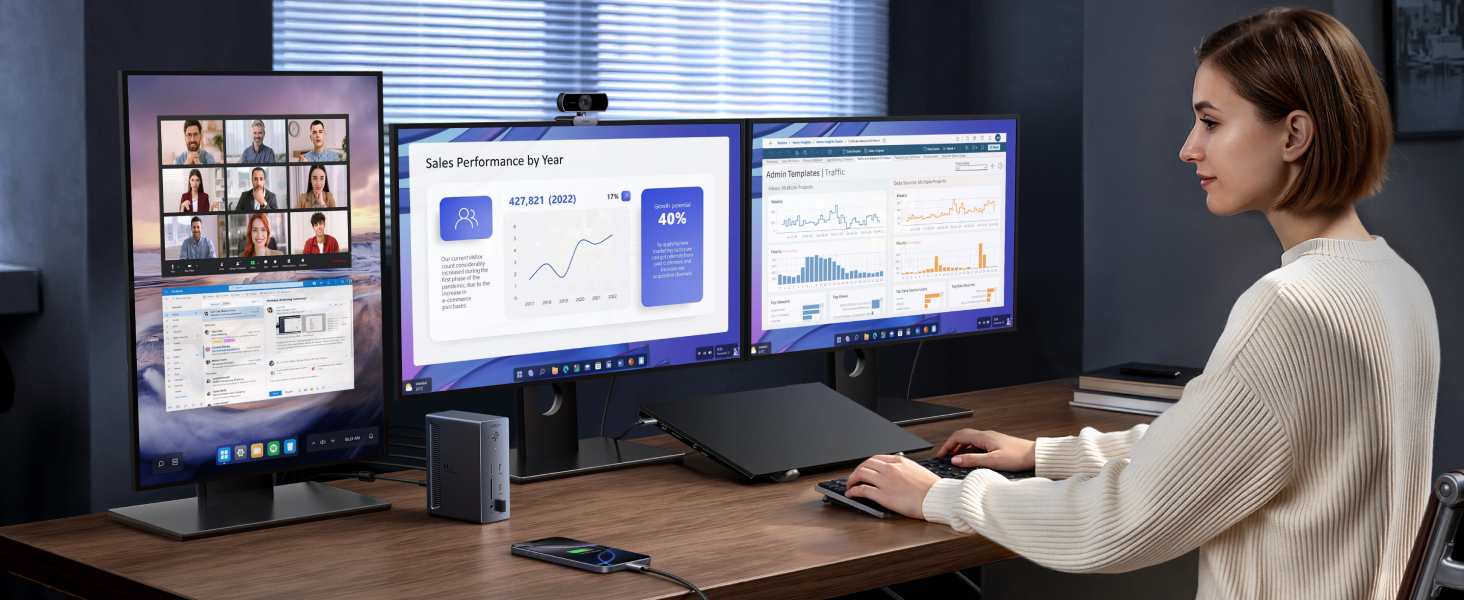
  • 14-in-1 Professional Connectivity: One-cable docking simplifies desk setup for hybrid office environments, equipped with 2 8K DisplayPort, a 4K HDMI port, a 100W USB-C upstream port, a 27W USB-C PD output, 2 USB-C 10Gbps data ports, 2 USB-A ports, 170MB/s SD/TF card slots, an Ethernet, a 3.5mm AUX port, and a 140W DC input
  • Single 8K, Triple 4K Display Versatility: Simultaneously drive three 4K monitors via dual DisplayPort and a HDMI port, enabling seamless multitasking. The dual DisplayPort both support up to 8K@30Hz or 4K@120Hz for a single monitor, delivers exceptional clarity and smoothness
  • True 100W Laptop Charging: Deliver full-speed 100W PD charging to high-performance laptops, replenishing 50% battery in 27 minutes. The USB-C PD port also supports charging your phone/tablet up to 27W (Note: The 100W upstream USB-C port and 27W USB-C output share a combined power of 100W. When both are in use, the maximum output power per port may be less than the individual rated maximum. )
  • Transfer Files in Seconds: Transfer 20GB files in 32 seconds through 10Gbps USB-C/A ports, while 170MB/s SD/TF card slots accelerate photo/video workflows. Gigabit Ethernet ensures stable video conferencing and cloud backups (Note: The front USB-C ports are for data transfer only, not support charging & display. )
  • Wide Compatibility: Supports USB-C, USB4, and Thunderbolt connections. Compatible with Windows 10 and 11, and laptops that support DP Alt Mode and Power Delivery
  • Extended Display Limited on macOS : The dock is not recommended for MacBook users who wish to connect mutli-monitors with different displays. For macOS, the external monitors will display identical content
  • Laptop's USB-C Requirements: The dock is plug and play, doesn't required install any drivers. For full compatibility, ensure your laptop's USB-C port supports both Power Delivery (for charging) and DisplayPort 1.2/1.4 Alt Mode (for display output), in addition to either USB4, Thunderbolt 5/4/3
  • In the Box: 1x Revodok Pro USB-C Docking Station, 1x USB-C to USB-C Cable (1m), 1x 140W Power Adapter, Power Cords (including UK plug)
Der UGREEN-Vorteil
Schneller & kostenloser Versand Schneller & kostenloser Versand
2 Jahre Produktgarantie 2 Jahre Produktgarantie
30 Tage Rückgaberecht 30 Tage Rückgaberecht
Lebenslanger Kundensupport Lebenslanger Kundensupport

Anzahl

Bezahlen Sie ganz einfach

Generic Generic Generic Generic Generic Generic Generic Generic Generic Generic

Zuverlässige Lieferung

Delivery ServiceDelivery ServiceDelivery Service
UGREEN Revodok Pro 14 - in - 1 Docking Station (Triple 4K, 2x DP + HDMI, 100W Charging, 10Gbps) - UGREEN EU

UGREEN Revodok Pro 14-in-1 Dockingstation (Triple 4K, 2x DP + HDMI, 100W Laden, 10Gbps)

€299,99 €199,99
Save33%

UGREEN Revodok Pro 14-in-1 Dockingstation (Triple 4K, 2x DP + HDMI, 100W Laden, 10Gbps)

aplus Inhaltsbild
aplus Inhaltsbild

Hinweise

1 Die Dockingstation wird MacBook-Nutzern, die mehrere Monitore mit unterschiedlichen Anzeigen verbinden möchten, nicht empfohlen. Bei macOS zeigen die externen Monitore identische Inhalte an.
2 Für volle Kompatibilität stellen Sie sicher, dass der USB-C-Anschluss Ihres Laptops sowohl Power Delivery als auch DisplayPort 1.2/1.4 Alt Mode unterstützt, zusätzlich zu USB4, Thunderbolt 5/4/3.
3 Nur DisplayPort unterstützt bis zu eine einzelne 8K@30Hz/4K@120Hz-Anzeige. Für 8K@30Hz/4K@120Hz stellen Sie sicher, dass der USB-C-Anschluss Ihres Laptops DP1.4 mit DSC (Display Stream Compression) unterstützt.
4 Um die beschriebene 4K@120Hz-Anzeige mit dieser Dockingstation zu erreichen, verwenden Sie ein DisplayPort 1.4-Kabel, das nicht länger als 3 m (28AWG) ist.
5 Der 100W Upstream USB-C-Anschluss und der 27W USB-C-Ausgang teilen sich eine Gesamtleistung von 100W. Wenn beide verwendet werden, kann die maximale Ausgangsleistung pro Anschluss unter dem individuellen Maximalwert liegen.
6 Um 100W Laptop-Ladung zu erreichen, stellen Sie sicher, dass Ihr Laptop das PD 3.0-Protokoll unterstützt und der 27W USB-C PD-Anschluss der Dockingstation frei von angeschlossenen Geräten ist.
7 Wenn Ihr Laptop mehr als 100W benötigt, verwenden Sie bitte das originale Netzteil.
8 Die vorderen USB-C-Anschlüsse sind nur für die Datenübertragung, unterstützen kein Laden und keine Anzeige.
9 Der 27W USB-C PD-Ausgang dient nur zum Laden.
10 Wir empfehlen, das mitgelieferte USB-C-zu-USB-C-Kabel zu verwenden, um die Dockingstation mit Ihrem Laptop zu verbinden, da andere Kabel Kompatibilitätsprobleme verursachen können.

Specs

Sku85489
Colour Grey
Hardware interface 3.5mm Audio, DisplayPort, Ethernet, HDMI, MicroSD, USB 3.0 Type A, USB 3.2 Gen 2×2
Compatible devices ThinkPad, Dell XPS, HP EliteBook, Surface
Total USB ports 8
Number of ports 14
Item weight 1 Kilograms
Total HDMI ports 1
Wattage 100.0
Input voltage 24 Volts (DC)